Terrain Tiles Without Pre-generation - Building Terrain Meshes at the CDN Edge
2026-06-17

I’m Inoue, CTO at Eukarya Inc. We’ve just officially released Re:Earth Terrain, an on-demand terrain tile delivery service: https://terrain.reearth.land. (We’ve also launched its sibling service, Re:Earth Buildings.) Both are open source; the code is available on GitHub: reearth/reearth-terrain and reearth/reearth-buildings.
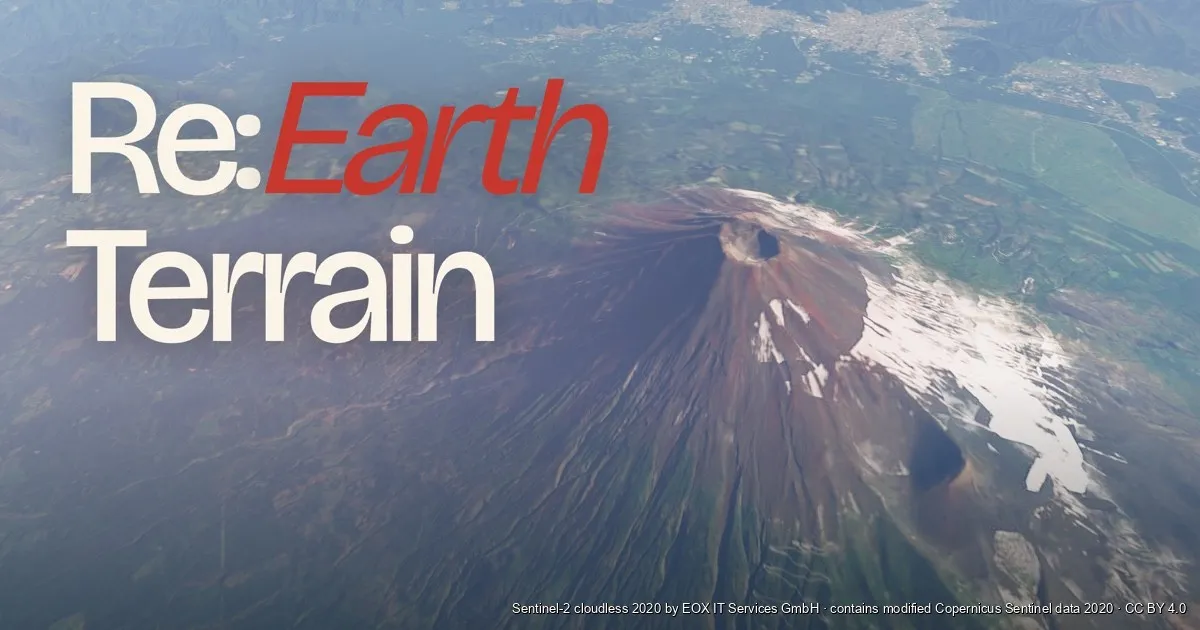
Re:Earth Terrain is a terrain delivery service that generates terrain tiles on the fly, every time a request comes in, instead of preparing all tiles in advance. We develop and operate the OSS product suite “Re:Earth” to handle geospatial information (including 3D) on the web, and this service is part of that effort.
In this article, I’ll walk through what we had to build to generate terrain tiles per request — and to do it at the CDN edge — down to the implementation details.
Terrain tiles used to be “something you pre-generate”
When you display a map on the web, the data is usually delivered in units called tiles. The world is split into a grid of small squares for each zoom level, and each square is addressed by “zoom z / column x / row y.” The browser fetches only the tiles needed for the current viewport and zoom. Because the source data is huge, you don’t ship it all at once; you split it and ship only what’s needed—this is the tile concept.
So, it’s common to convert source data into tiles before serving. For example, for vector data you might use tools like tippecanoe to convert large GeoJSON into a set of tiles by zoom and region. Most basemaps we use daily are pre-generated tiles.
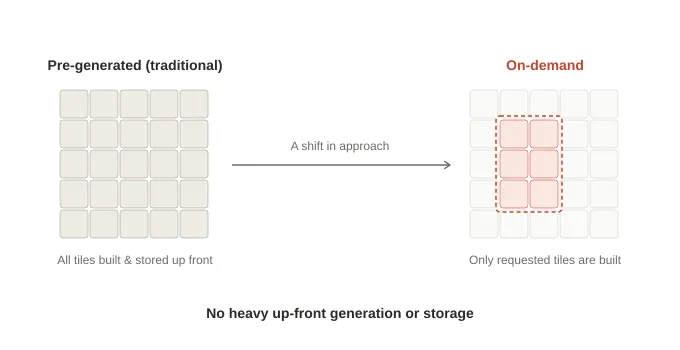
Terrain is also delivered as tiles. Terrain tiles are data that turns elevation (DEM) into 3D relief. But terrain tiling is heavier than vector or image tiling: you gather elevation data, convert it into a 3D mesh, generate tiles for all zoom levels and all regions, and store them. Every time you add data or change the reference, you rerun the conversion from scratch. In short, terrain tiles were something you spend time to pre-generate before delivery.
Generating tiles at request time is not, in itself, unusual. For vector tiles there are pg_tileserv and Martin, which assemble MVT from PostGIS on the fly; for rasters there is TiTiler’s dynamic tiling, which cuts tiles out of COGs; and services such as Felt, Fused, and CARTO all offer per-request generation. Dynamic tile delivery is an established option.
And yet terrain alone stayed with pre-generation. The reason is clear enough: generating a terrain tile is heavy. You assemble an elevation grid, triangulate it, quantize it, and encode it — a different kind of work from slicing a raster and returning it. If you have to stand up an origin server and do that on every request, building everything in advance is the more sensible choice.
What we tried was removing that premise. Push the heavy numeric work into Rust/WASM, read only the bytes each tile needs from upstream via Range GET, and run the whole thing at the CDN edge. Could we assemble terrain meshes per request with no origin at all? Re:Earth Terrain (terrain.reearth.land) is what came out of that question.
Once you stop pre-generation, operations change drastically. The heavy pipeline of converting and storing every tile disappears. If you update upstream data, the next request for an affected tile automatically reflects the new content. There’s no need to manage re-tiling batch jobs. This article explains what we built to make per-request generation viable in real operations.
What Re:Earth Terrain returns — terrain with selectable vertical datum
Before the mechanics, let’s clarify what we deliver: terrain elevation, i.e., the relief of the earth’s surface. We return it in formats such as Cesium’s quantized-mesh or raster formats that libraries like MapLibre can consume (details later).
One key feature is that you can choose the height reference (vertical datum) per request. 3D globes (Cesium/three.js) render the earth as the WGS84 ellipsoid and treat its surface as zero height. Meanwhile, DEM elevations are usually orthometric heights (mean sea level). These differ by tens of meters depending on location (around ~37m near Mt. Fuji). If you place sea-level heights onto an ellipsoid globe, terrain appears floating or sunk.
Re:Earth Terrain normalizes the vertical datum per request. You select the datum via a URL parameter (data_type).
data_type | Returned height | Main use cases |
|---|---|---|
ellipsoid | Ellipsoidal height (DEM + geoid undulation) | Putting terrain on 3D globes like Cesium |
elevation | Orthometric height (DEM as-is) | MapLibre, contours, overlays referenced to sea level |
geoid | Geoid undulation only | Coordinate conversion, geoid visualization |
From the same data, you can switch only the reference via URL. For example, it can be used as-is to put terrain at the correct height in 3D city platforms like PLATEAU.
Here is all the code you need from Cesium:
import * as Cesium from "cesium";

const terrain = await Cesium.CesiumTerrainProvider.fromUrl(
  "https://terrain.reearth.land/cesium-mesh/ellipsoid",
  {
    requestVertexNormals: true, // Request normals for shading
    requestWaterMask: true,     // Request water mask
  },
);

const viewer = new Cesium.Viewer("cesium", { terrainProvider: terrain });
viewer.scene.globe.enableLighting = true;
fromUrl reads layer.json (the tileset metadata) and automatically learns how to build tile URLs, the available zoom range, and supported extensions.
How per-request tile generation works
Now for the core. Re:Earth Terrain runs on Cloudflare infrastructure. Two pieces matter here:
- Workers (execute code at edge locations)
- R2 (object storage)
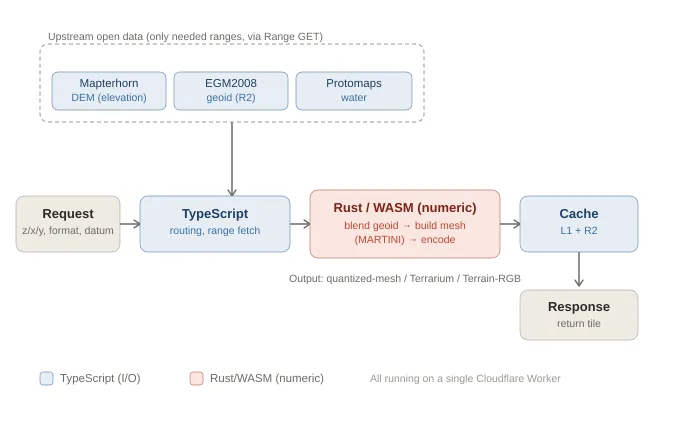
Re:Earth Terrain runs with just one Worker and R2. There’s no dedicated tile server fleet, and no pre-generation batch system.
The flow from request to response:
-
Interpret the request. Parse z/x/y, output format, and vertical datum from the URL.
-
Fetch only the upstream data you need. Re:Earth Terrain does not mirror full datasets. It fetches only the necessary ranges on demand:
- Elevation: Mapterhorn (open global DEM dataset)
- Water mask: Protomaps (OpenStreetMap-derived data distributed as PMTiles, range-readable)
- Geoid model: EGM2008 (small enough to store as a single range-readable GeoTIFF); we keep this in R2
All are read via HTTPS range requests (Range GET), pulling only the bytes required for the tile. We do not copy entire datasets into Re:Earth Terrain.
-
Do numeric processing in WASM. Assemble elevation grids, add geoid undulation as needed, mesh and quantize, and encode into the requested format (details later).
-
Store in cache and return. Save the generated tile, then respond. Next time, return it from cache.
The key is: we do not pre-generate tiles. If upstream DEM updates, the next request for a tile automatically regenerates it with new data. We don’t have to run re-tiling ourselves.
Rust/WASM for computation, TypeScript for I/O
The Worker is written in TypeScript, and compute-heavy numeric processing runs in Rust compiled to WebAssembly (WASM). We split work not by “topic,” but by “capability”:
- TypeScript handles everything that touches runtime/external resources: HTTP routing, R2/cache access, fetching upstream data, planning which GeoTIFF ranges to read, decoding vector tiles (MVT), computing ETags, etc.
- Rust/WASM handles pure numeric processing only: elevation pixel encoding/decoding, mesh generation, quantized-mesh serialization, etc.
TypeScript passes byte arrays in, and receives byte arrays out. WASM knows nothing about external resources. This boundary makes numeric processing easy to test and portable.
Output formats — deriving three formats from the same elevation
Re:Earth Terrain outputs formats that client libraries already support:
- quantized-mesh-1.0 — terrain mesh tiles that Cesium can load.
- Mapbox Terrain-RGB / Mapzen Terrarium — raster tiles for MapLibre/Mapbox GL/deck.gl, encoding elevations in RGB.
- Water mask — water extent derived from Protomaps, attached to terrain mesh (Cesium extension) or delivered as standalone raster tiles.
Mesh (quantized-mesh) and raster (Terrarium/Terrain-RGB) share the same elevation grid and branch only at the final encoding step.
Compositing rasters, then “raising” them into a mesh
This is the heart of Re:Earth Terrain. Let’s follow how fetched data becomes one terrain mesh tile. For meshing and encoding, we use our OSS libraries: terrain-codec.
First, composite rasters into a single elevation grid:
- Decode DEM. Mapterhorn DEM tiles are raster tiles that encode elevation in RGB. We decode them to a grid of orthometric heights (meters). For areas without the requested zoom-level tile upstream, we fall back to parent tiles and resample to prevent unnatural steps from missing data.
- Read geoid. Read EGM2008 geoid undulation for the same tile extent and pixel size via bilinear interpolation.
- Add them. Align grids and add per pixel: “orthometric height + geoid undulation” to obtain ellipsoidal heights (for
ellipsoid). Forelevation, use DEM only; forgeoid, use undulation only.
For raster outputs, we encode this grid into colors and return it. For mesh output, we proceed to terrain-codec.
Next, build a mesh from the elevation grid:
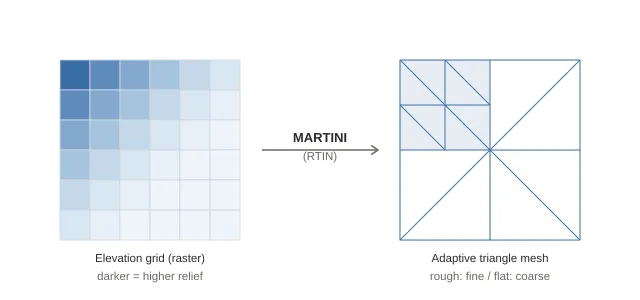
- Prepare a mesh grid. MARTINI requires a square grid of size 2ⁿ+1. We use 65×65 (=2⁶+1). To avoid cracks between tiles on a globe, we include one extra row/column from neighboring tiles on the east and south edges (a “halo”).
- Build an error pyramid (RTIN). MARTINI computes, for every possible right isosceles triangle on the grid (from small to large), the maximum error incurred when omitting the midpoint (difference between true height and linear interpolation from endpoints). Larger triangles inherit child errors. This records, for each grid point, the maximum error if that point is omitted—core to RTIN.
- Construct the mesh using a threshold. Starting from two large triangles, recursively split only triangles whose midpoint error exceeds a tolerance (
max_error, zoom-dependent). Result: rough areas get finer triangles; flat areas get coarser ones. Completely flat tiles can collapse to just two triangles (four corners). This is an adaptive mesh that avoids wasting vertices on flat regions. (For more, see “What is RTIN, which builds hierarchical LOD in real time?”.) - Re-sample heights at vertices. After building the error pyramid, MARTINI doesn’t retain heights. So we reconstruct grid coordinates from each mesh vertex (u,v), re-sample height from the elevation grid, and assign it.
- Quantize. Quantize (u,v,height) into integers 0–32767. Height is normalized within each tile’s min–max vertex height range (which may collapse to zero for flat tiles).
- Add headers/borders/normals and encode. Compute the horizon occlusion point (for deciding if a tile is behind the horizon) from mesh vertices and store it in the header. Enumerate border vertices on all four edges, and attach normals (for shading) and water masks if requested. Serialize to quantized-mesh-1.0 bytes and gzip-compress. Normals computed only within the tile can cause discontinuities at borders, so we compute normals using slopes from the halo read in step 1 to make shading smooth across tile boundaries.
Steps 4–6 are executed together by terrain-codec’s encode_terrain, which takes an elevation grid and performs meshing, quantization, header construction, normal calculation, and encoding, returning compressed .terrain bytes.
Caching and invalidation — making on-demand work in production
The first concern with on-demand generation is: “won’t it be slow and expensive if we generate every time?” The answer is: we generate only the first time; subsequent requests are served from cache. The cache design is the core of making this service work.
Web caching and ETag
The web has built-in caching: data you fetch once is stored in the browser and in CDN edge locations close to users, so subsequent requests use the cached copy. There’s also conditional requests: the client asks “has it changed?” and if not, the server can respond without sending the body. This check uses an ETag.
An ETag is a short identifier tied to response content. The server attaches it; the client sends it back via If-None-Match. If content hasn’t changed, the server returns 304 Not Modified without transferring the body, saving bandwidth and compute.
In Re:Earth Terrain, we compute ETags from the factors that define a tile’s content (tileset name/version, output format, datum, z/x/y, etc.). In other words, the ETag corresponds to the tile’s content. If If-None-Match matches, we return 304 immediately—before looking up cache or generating.
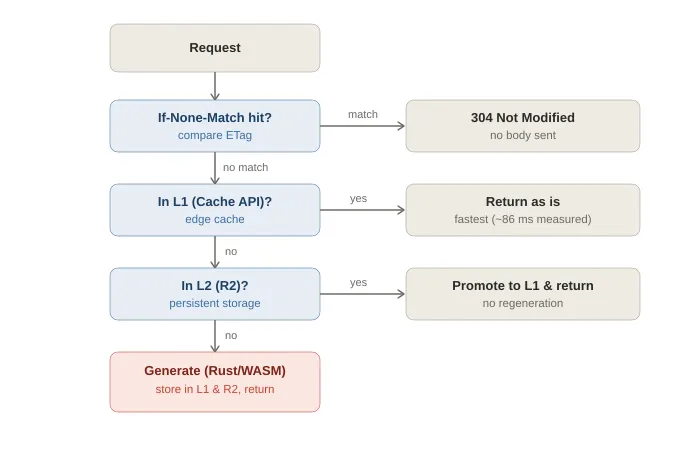
Our server-side cache is two-tier:
- L1: Cloudflare Cache API (edge cache)
- L2: R2
If the tile exists in L1, return it. Otherwise, check L2. If absent in both, generate it. Strictly speaking, browser cache sits in front of this; we set a relatively long cache-control (described later) so many repeat accesses never reach the server at all.
Because Workers can integrate with Cache API, you can design the cache strategy itself: the key structure, lookup order, and invalidation logic. The most important part is cache key design; the invalidation mechanism described next works because we can build keys based on tile content.
Invalidating only the tiles whose content changed
The challenge of on-demand is to invalidate only affected tiles when upstream data changes. We handle three factors with different speeds of change, each with its own mechanism:
- Whole-service updates due to operator changes. E.g., swapping encoders or geoid models—cases where you want to invalidate all tiles. We simply bump a version number and switch the cache key prefix. Old tiles under the old prefix stop being referenced. A daily Cron job deletes unused old prefixes.
- Upstream updates at tile scale. Protomaps (water data) is rebuilt frequently; we ingest it weekly. If we put the update date into the cache key, all water-bearing tiles would invalidate at once. Instead, we compute an identifier from the specific PMTiles byte range the tile actually reads and incorporate that into the key. Even if the dataset updates, if the relevant range for a tile hasn’t changed, the cache survives.
- Upstream updates at regional scale. The DEM (Mapterhorn) is rebuilt regionally. When a cached tile is older than a threshold (6 hours), we query upstream for updates; only tiles in changed regions are invalidated. Even for big updates, we don’t rebuild everything.
By separating these three, we can invalidate “all when code changes,” “only impacted water tiles when water updates,” and “only affected regions when DEM updates,” without under- or over-invalidation.
Latency — measured: 2.4s first time / 86ms second time
Here’s a measurement example for a remote tile (inland Nevada, USA) with little traffic. Measurements were taken from Japan and include round-trip time to the edge.
| Request | Cache | Latency |
|---|---|---|
| Terrain tile (quantized-mesh), first request with generation | MISS | ~2.42 seconds |
| Same terrain tile, second request | HIT (L1) | ~0.09 seconds (~86 ms) |
The first request takes ~2.4s because we generate on the fly, including upstream range fetches and mesh generation.
Looked at another way, fitting the entire pipeline—multiple upstream fetches, decode, geoid composition, meshing, encoding—into ~2.4s is actually quite fast. Two main reasons:
- Upstream data is already in range-readable forms. DEM in XYZ/PMTiles, water in PMTiles, geoid as a COG (range-readable GeoTIFF), so we can fetch only required bytes rather than downloading everything.
- Heavy numeric work runs in Rust/WASM. Without these, on-demand generation wouldn’t be practical.
The second request returned from edge L1 cache in ~86ms (this is largely the Japan↔edge RTT).
We set cache-control: max-age=2592000 (30 days) for generated tiles. This 30 days is the L1 freshness. Even after it expires, tiles are stored in L2 (R2), so we return from R2 without regeneration. Regeneration happens only when content is invalidated (upstream updates or version bumps). In other words, generation cost is essentially paid only once per tile, and most production traffic is served from cache (L1 or R2).
Why it’s not only fast but also cheap — a change in assumptions via edge computing
We’ve discussed speed; the other axis is cost, and you can’t explain both without the infra shift of recent years.
For a long time, the standard pattern was: “dynamic processing runs on origin servers; CDNs just cache results at edge.” If you want dynamic terrain tiles, you stand up tile servers in a data center, pay for compute, and pay egress based on delivered bytes. For geospatial services that distribute lots of bytes globally, egress has historically been a major cost.
But “where computation runs” has been changing in stages:
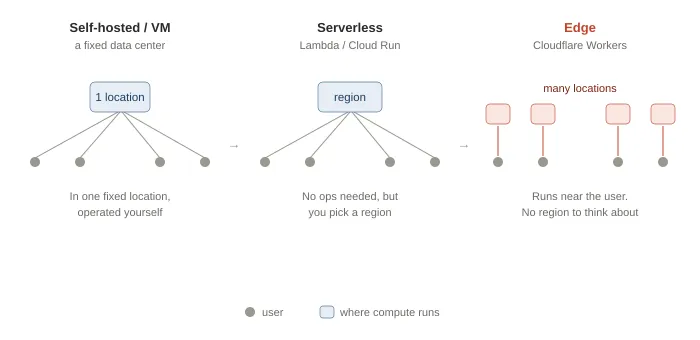
- First: self-managed servers/VMs in a specific data center.
- Then: serverless like AWS Lambda or Google Cloud Run—no server management, but you still choose regions, and users far from your region pay the latency.
- Recently: edge computing has become practical. With Cloudflare Workers, code runs not in a fixed region but near where requests are received. It’s executed at the same locations where CDNs used to just cache static files. You almost don’t have to think about regions anymore—the region concept becomes invisible to end users. Re:Earth Terrain runs its Rust-as-WASM engine on this edge runtime.
The cost structure has also shifted. Cloudflare R2 has no egress fees. For services that ship lots of tiles worldwide, this is decisive. And Workers are billed per request/execution, so you don’t need always-on origin servers.
Re:Earth Terrain is designed to maximize these changes:
- No always-on origin server fleet; compute runs on demand at the edge close to users.
- No pre-generation and storage of all tiles; generate only requested tiles and store them in L1 (edge cache) and R2 (egress-free).
- Delivered bytes come from the edge without egress fees.
To give an order-of-magnitude sense (based on public Cloudflare pricing as of 2026): paid Workers plans start around 0.015/GB-month, and egress is free. Since most requests are served from cache and generation happens mostly once per tile, monthly cost often stays in the range of a few to a few dozen dollars, depending on traffic and cache hit rate. Costs don’t balloon with egress or accumulate from always-on servers. Note that the storage costs for upstream data mirrors are not included. Re:Earth Terrain mirrors upstream data.
Fast because it runs near users; cheap because there’s no idle server fleet and no egress. The latency numbers above (2.4s first time, ~86ms after caching) only become possible with this edge-first architecture. “Fast and cheap” is achieved when on-demand generation meets edge computing as its foundation.
The same idea for buildings — sibling service: Re:Earth Buildings
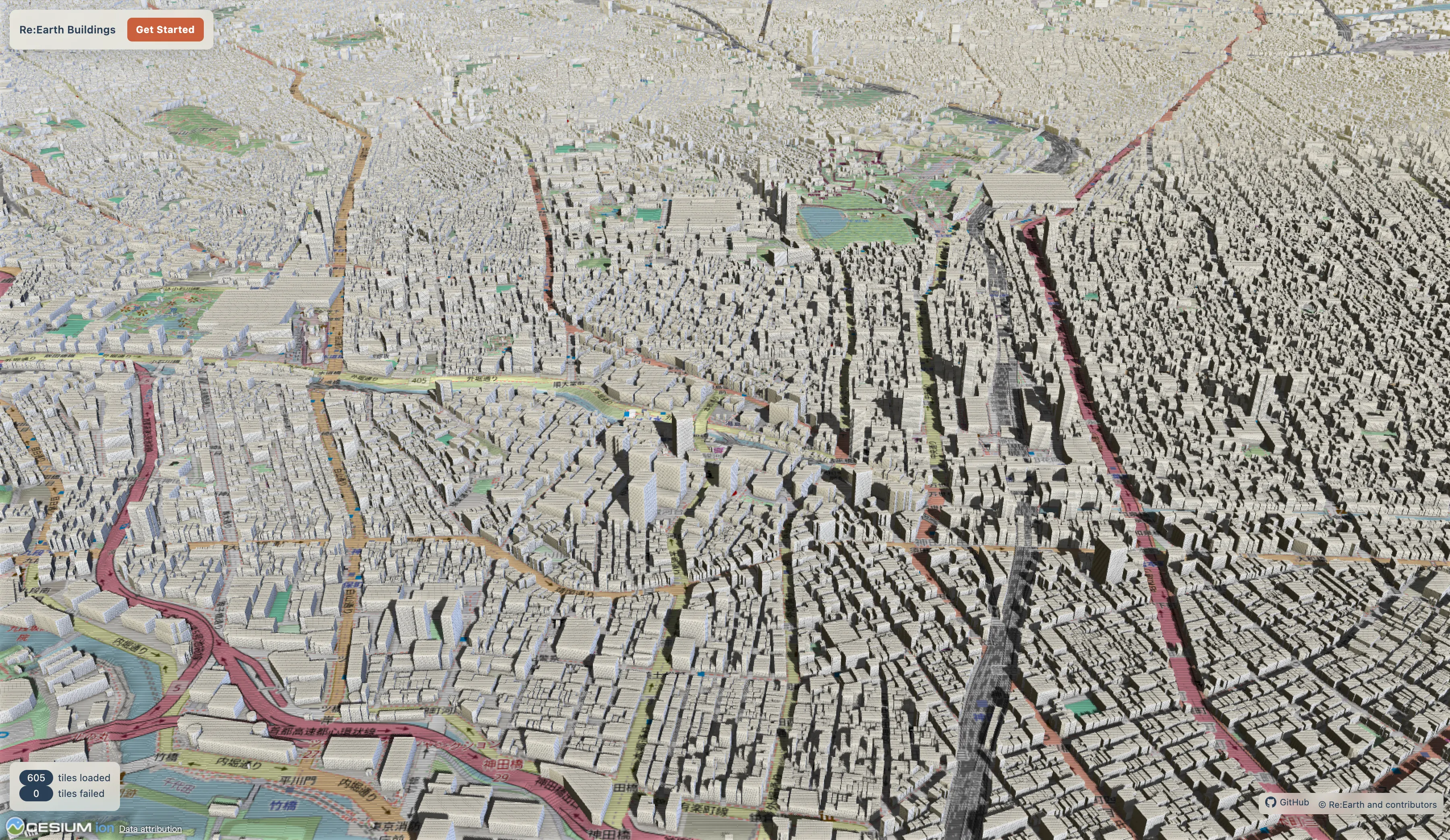
The idea “generate at the edge per request” is not limited to terrain. We apply it to buildings as well: Re:Earth Buildings generates 3D building tiles (3D Tiles 1.1) on demand from building footprints in Overture Maps (an open dataset).
For ground height, it uses Re:Earth Terrain’s ellipsoidal heights so buildings’ bases align tightly with the terrain—one reason we develop both services together: terrain and buildings share the same vertical datum.
The hard part for buildings is deciding “height.” Overture has explicit heights only for some OSM-derived buildings; many ML-generated footprints have no height. We therefore decide height with five-tier precedence and record which method was used: 1) explicit height 2) floors × 3 meters 3) heuristic by building class 4) heuristic by subtype 5) inference from floor area
In the last step, we also correct based on local building density to avoid tall skinny downtown buildings being inferred as single-story.
We validate and tune this height estimation by comparing against PLATEAU (Japan’s detailed open 3D city model) ground truth. We use Japan’s precise dataset as a yardstick for global open building data.
Closing: open services on top of open data
Long after dynamic tile delivery had become commonplace, terrain tiles were still treated as “something you pre-generate before delivery.” But only a tiny fraction is ever viewed. This “generate everything upfront” heaviness bothered us.
We built Re:Earth Terrain because we needed it. When you place terrain onto a 3D globe in Re:Earth, the ellipsoid vs sea-level difference shows up as visible floating/sinking. To align heights correctly in 3D city platforms like PLATEAU, we needed terrain delivery where you can choose the datum per use case. That practical need was our starting point. Switching to on-demand generation allowed us to drop pre-generation heaviness and make upstream updates reflect automatically.
We also have a clear reason for offering it for free and as OSS. Both Re:Earth Terrain and Re:Earth Buildings stand on open data (OpenStreetMap, Mapterhorn, EGM2008, Overture). If we benefit from open data built by people worldwide, the services we build on top should also be open. So we’ve released the code under the MIT license: receive value, and return it in a form others can build on.
We develop Re:Earth as an open-source data platform for public-sector and civic domains. Terrain and buildings are part of that larger picture. Removing the assumption of “prepare everything in advance,” and stacking open services on open foundations— we’ll continue exploring how far this idea can go.
References
Re:Earth Terrain: https://terrain.reearth.land/
Re:Earth Terrain GitHub: https://github.com/reearth/reearth-terrain
Re:Earth Buildings: https://buildings.reearth.land/
Re:Earth Buildings GitHub: https://github.com/reearth/reearth-buildings
Eukaryaでは様々な職種で採用を行っています!OSSにコントリビュートしていただける皆様からの応募をお待ちしております!
Eukarya is hiring for various positions! We are looking forward to your application from everyone who can contribute to OSS!
Eukaryaは、Re:Earthと呼ばれるWebGISのSaaSの開発運営・研究開発を行っています。Web上で3Dを含むGIS(地図アプリの公開、データ管理、データ変換等)に関するあらゆる業務を完結できることを目指しています。ソースコードはほとんどOSSとしてGitHubで公開されています。
➔ Re:Earth / ➔ Eukarya / ➔ note / ➔ GitHub
Eukarya is developing and operating a WebGIS SaaS called Re:Earth. We aim to complete all GIS-related tasks including 3D (such as publishing map applications, data management, and data conversion) on the web. Most of the source code is published on GitHub as OSS.