Tempura - A Cross-Provider Privileged Access Manager Built on Google Cloud PAM
2026-09-16
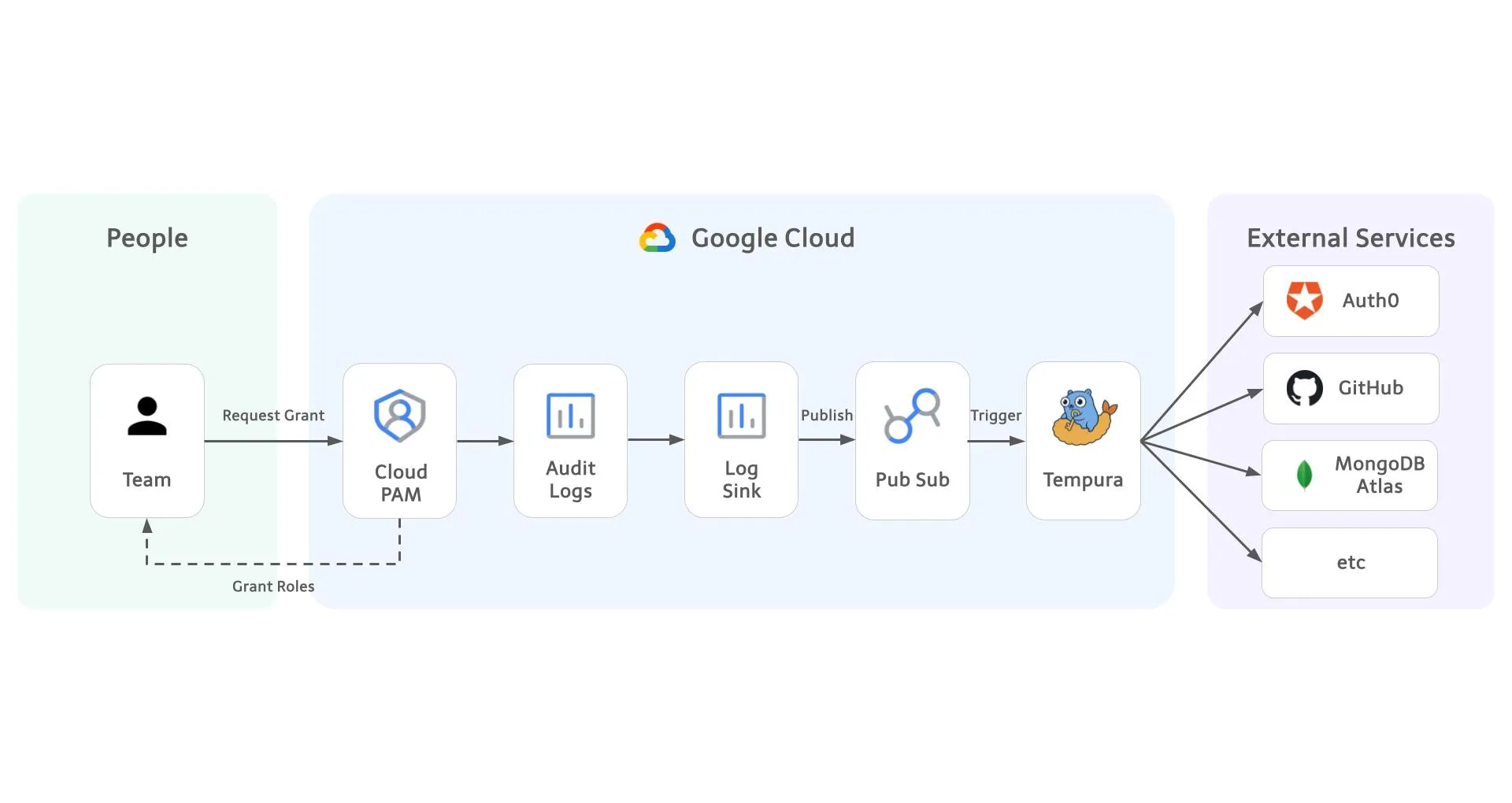
I'm keke, an SRE at Eukarya.
We run almost everything on Google Cloud, and for elevated access to Google Cloud itself we use Privileged Access Manager (PAM): nobody holds standing roles, you request the role you need for the time you need it, an approver reviews it, and the access disappears on its own when the time is up.
This article is about how we extended that same flow to everything outside Google Cloud. Today, requesting access to the SaaS products we depend on, such as our database provider or GitHub, works exactly the same way as requesting a Google Cloud role: one console, one approval flow, one audit trail, and access that always expires. Every request is still reviewed and approved by a person. What we automated is everything after the approval: creating the access, and, more importantly, removing it.
We built a small service called Tempura: one container on Cloud Run and a few dozen lines of YAML. The name blends temporary and access, after tempura, the Japanese dish of seafood and vegetables fried in a light, crispy batter. It is best served fresh and never meant to sit around. Access is the same: just enough, just when you need it. Best served fresh each time. In this article I'll explain why we extended what we already had, how Tempura works, and what a security team gets out of this design.
1. One front door
As I said at the top, our Google Cloud side was already in good shape: PAM handled requests, approvals, durations, and expiry for us. That part worked.
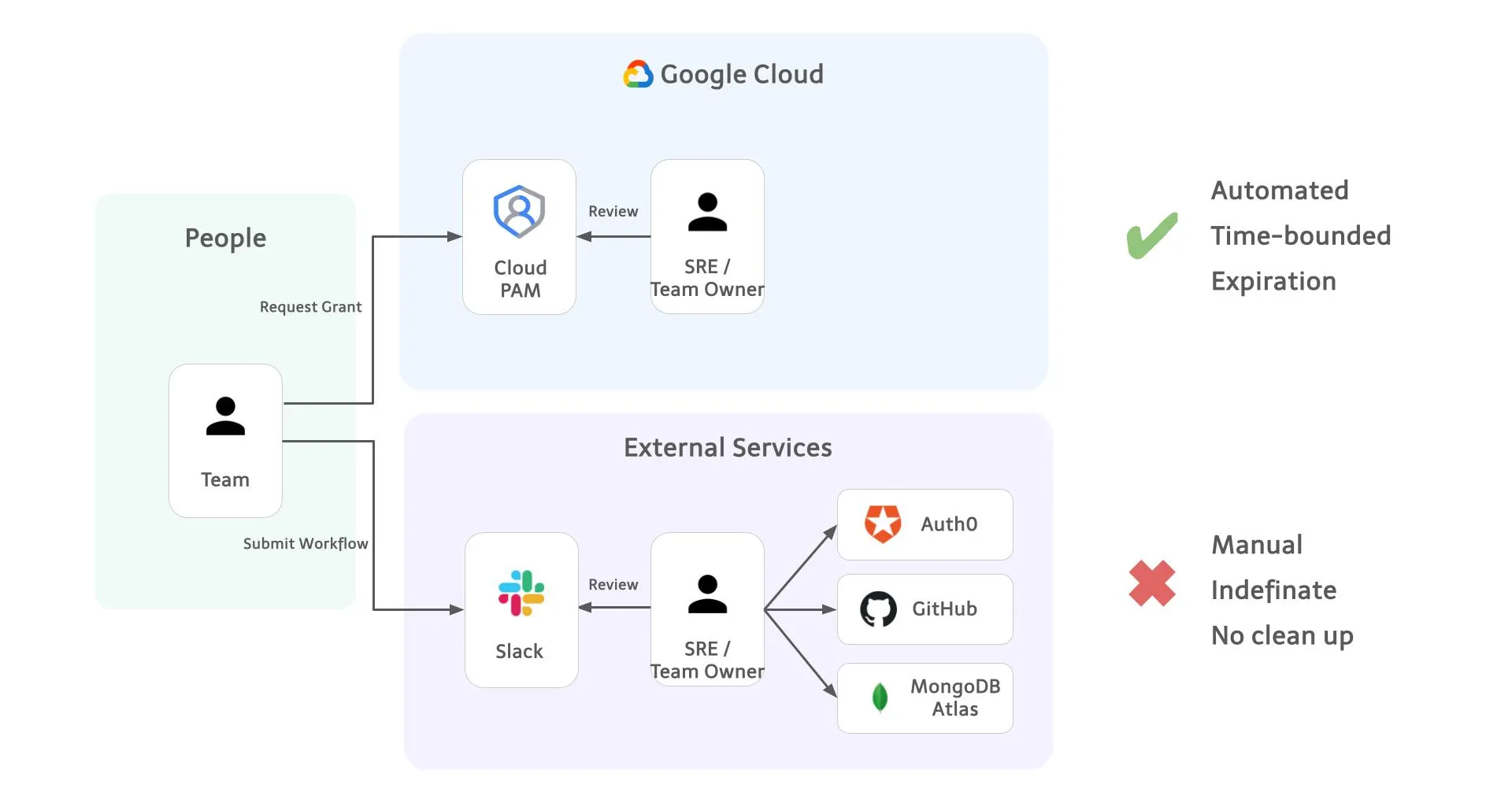
Everything outside Google Cloud did not. The request itself always came the same way, a message on Slack. The problem was what happened next: the person granting the access had to do it by hand, and every product had its own way to do it.
- Database access: create a database user with the right roles in the provider's console or CLI.
- GitHub: add the person to the right team in the organization settings.
- Identity provider: assign an admin role on the tenant from the admin dashboard.
Each of these is a different console, a different set of steps, and a different thing to remember to undo later.
This created three separate problems for three separate groups of people.
For the people requesting access
- There is no menu of what you can ask for. You describe what you need in a sentence, the admin interprets it, and what you get depends on how it was read. Then you wait, with no way to see whether the request was seen, approved, or forgotten in the thread.
- Because asking is annoying, people keep access once they have it. That is how permanent and strong permissions accumulate.
For the reviewer
- Requests arrive as Slack messages and interrupt whatever they were doing.
- People ask to be added. Nobody ever asks to be removed. So removal simply does not happen until someone runs an audit and finds accounts that should have been gone months ago.
For security and audit
- The approval trail is spread across Slack threads, admin consoles, and inboxes. Sometimes access is agreed on in a meeting and granted right after, leaving no trace at all.
- Answering "what did this person have access to last month?" means opening one admin console per product.
Three problems, one root cause: every product had its own front door.
So the fix is to have only one. We route every access request, for Google Cloud and for SaaS alike, through Google Cloud PAM, and each of the three problems is solved at that single door:
- There is one procedure. Users learn the PAM request screen once and use it for everything.
- Removal becomes automatic. Most SaaS products have no notion of temporary access. A database user or a team membership simply exists until someone deletes it, so the expiry has to be enforced from outside. Every PAM grant already has one. If SaaS access is created from a PAM grant, it can be deleted the moment that grant expires, with nobody having to remember.
- The audit trail lands in one place. Every request, approval, and expiry is recorded in Cloud Audit Logs, whichever product it was for, in the same logs we already keep for Google Cloud itself.
And because every grant expires, permanent permissions never accumulate in the first place. We did not make access reviews faster. We made them unnecessary for this path, because there is nothing left over to review.
2. What we actually needed
Before building anything, we wrote down what a single front door requires:
- An approval workflow with a policy on who can request and who can approve
- Verified identity of the requester
- A time limit on every grant
- An audit log
- Something that actually creates and deletes the access in the external product
Google Cloud PAM already gave us the first four. It is tied to Google Cloud IAM for identity, it has approval policies, every grant has a duration, and everything is written to Cloud Audit Logs. The only thing missing was number five.
| What we needed | Covered by |
|---|---|
| Approval workflow and policy | Google Cloud PAM |
| Requester identity | Google Cloud IAM |
| Time limit on every grant | Google Cloud PAM |
| Audit log | Cloud Audit Logs |
| Creating and deleting access in external products | Missing — this became Tempura |
So instead of adding a second front door, with its own approvers, its own policy language, its own audit trail, and one more procedure for everyone to learn, we extended the one we already had.
3. What Tempura is
Tempura is a small service that listens for PAM grant events, approvals and expiries, and turns them into changes in external products. We currently use it internally and plan to release it as open source.
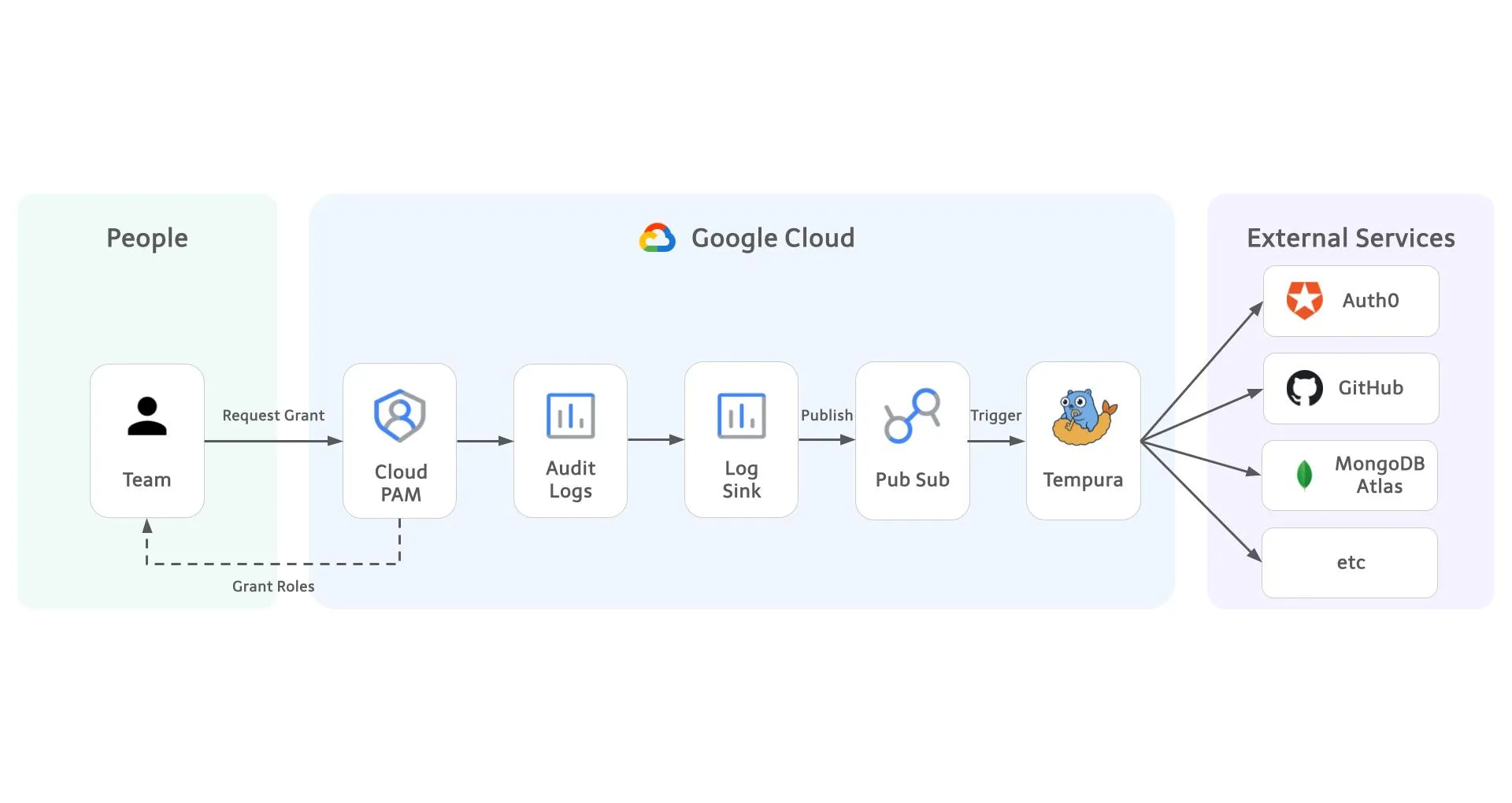
The most important design decision is the split of responsibilities. Approval and execution are handled by different systems.
| Responsibility | Owner |
|---|---|
| Who can request, who approves, maximum duration | Google Cloud PAM |
| Verifying the requester's identity | Google Cloud IAM |
| Creating and deleting access in the external product | Tempura |
| Storing the credentials for external products | Secret Manager |
Tempura cannot approve its own grants. It cannot extend a duration. It cannot change a PAM policy. It only acts on grants that PAM has already approved, and only within the scope of that approval.
Why Terraform providers
Every SaaS product has a different API. We did not want to write and maintain client code for each one. Terraform providers already exist for more than 5,000 products, and each one knows how to create, read, and delete resources such as "a database user" or "a team membership".
Tempura talks to those providers directly using the same plugin protocol that the Terraform CLI uses. We do not run the Terraform CLI, and there are no Terraform state files. When a grant is approved, Tempura asks the provider to create a resource. When the grant expires, Tempura asks the provider to delete it.
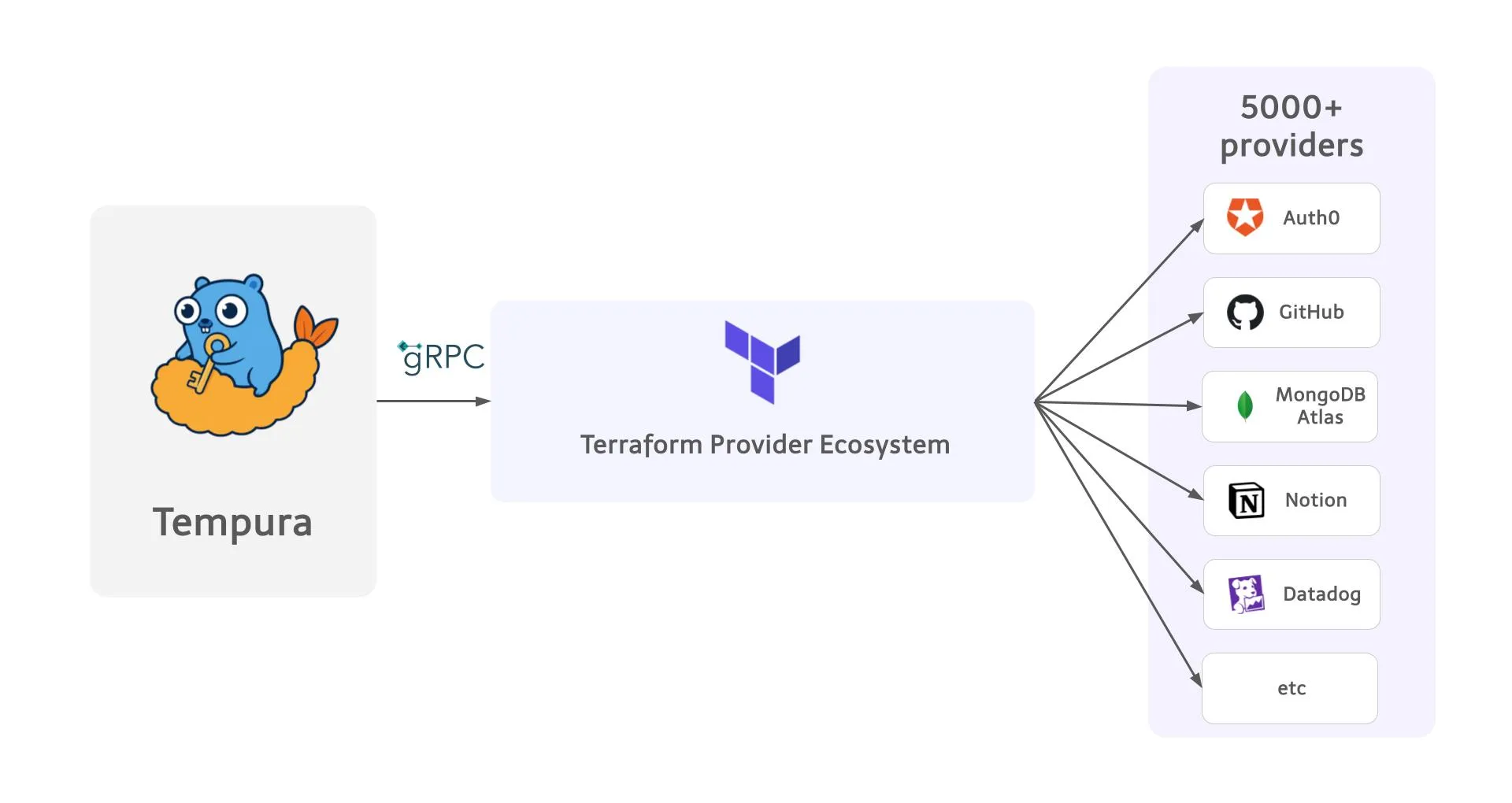
This means we never write or maintain a client for any product. It also means Tempura runs on the same stack we already use for infrastructure as code: the providers, the resource types, and the arguments are the ones our team already knows from Terraform. When we want to support a new cloud provider or SaaS product, we get a mature, well-maintained provider from an ecosystem that thousands of organizations depend on, instead of building and testing an integration ourselves.
4. What it looks like for users
Requesting access to a database now looks the same as requesting access to a Google Cloud project.
- Open Google Cloud PAM in the console.
- Pick an entitlement, for example
mongodbatlas-read. - Choose a duration and write a justification.
- Wait for an approver to review and approve the request. Requester will get an email.
- Connect. Work. The access disappears when the time is up.
Two details make this more secure than the old Slack flow, not just more convenient.
Users never receive a credential. This follows from a rule we already apply everywhere: every service is signed into with our Google identity through OAuth, OIDC, or SAML, and no person holds a static username and password or a long-lived API key. Tempura keeps that rule intact. For our database provider we use its workforce identity federation, so the database user Tempura creates is tied to the requester's Google account, and the user connects with their Google login. There is no password to send over Slack, store in a password manager, or forget to rotate. This is also why we did not need a credential vault: there is nothing to put in it.
Approvers see nothing new, and they are still in the loop. A database request is reviewed and approved by a person in the same screen, with the same notification, as a Google Cloud role request. Tempura only runs after that approval.
And a side effect that security teams will appreciate: there is now exactly one path to elevated access in these products, and it goes through PAM. Nobody has to map out who could reach what through which route, because there is only one route.
5. What it looks like for administrators
Adding a new kind of access is a configuration change reviewed in a pull request, not a runbook. This is the entire definition for read-only access to a database:
providers: # Just like provider block in Terraform
  - name: mongodbatlas
    source: mongodb/mongodbatlas
    version: "2.12.0"
    config:
      client_id: ${MONGODB_ATLAS_CLIENT_ID}
      client_secret: ${secret:projects/my-project/secrets/mongodb-atlas-client-secret/versions/latest}

entitlements:
  - id: "^mongodbatlas-read$"
    resources:
      - type: mongodbatlas_database_user # Use resources to manage users
        provider: mongodbatlas
        contexts: # Use data sources as contexts
          - id: project
            source: mongodbatlas_project
            config:
              name: reearth-dev
        config:
          username: "<workforce-idp-id>/google-apps|{{.Grant.Requester}}"
          project_id: "{{.Context.project.project_id}}"
          auth_database_name: "$external"
          oidc_auth_type: USER
          roles:
            - role_name: readAnyDatabase
              database_name: admin
A few things to notice:
- The provider credential is a reference to Secret Manager. It is never written in the file and never shown to a user.
- The entitlement ID is a regular expression anchored on both ends, so a typo cannot accidentally match a broader set of PAM entitlements.
- The requester's email is injected from the PAM grant. Nothing in the file is specific to one person.
GitHub team membership looks the same, just with a different provider and resource type. Once you have written one, the next one takes minutes.
This file lives in git next to the PAM entitlement definitions, so access design gets the same history, review, and CI as the rest of our infrastructure.
6. Security design
6.1 No standing privileges, enforced by structure rather than policy
This matters well beyond day-to-day security. Audits, compliance frameworks, and internal controls keep asking the same two questions: who had access to what, and who approved it? And is anyone holding access they no longer need? A model where nobody holds standing access, and every grant is approved by a person, recorded, and expires on its own, answers both questions by construction rather than by investigation. That is why we treat "no standing privileges" as the property the whole design has to protect.
This matters more, not less, now that AI agents are starting to do real work in our environment. A coding agent or an automation pipeline that holds a long-lived credential can use it at any time, at machine speed, on inputs nobody has reviewed. The right model for an agent is the same one we want for people: no standing access, a scoped grant that is approved and recorded, obtained at the moment the task needs it and gone when the task is done. The more actors there are that can hold access, and the faster they act, the more it matters that access is grabbed for a task and dropped afterwards, and that every grant lands in an audit log that a person, or another system, can read. Zero standing privileges is not a hardening step for the AI era. It is the baseline that makes it safe to let agents in at all.
A policy that says "remove access when done" depends on people remembering. We wanted the guarantee to come from the system.
- When a grant expires, the default action is to delete the resource, not to downgrade it. A database user is removed, not demoted.
- There is no configuration option that creates access without an expiry. You cannot write a permanent grant even if you try.
- The periodic access review that most organizations run to catch leftover permissions becomes unnecessary for this path. There is nothing left over to find.
6.2 Revocation must succeed even when things break
The scariest failure for a system like this is not a failed grant (the user notices and asks again). It is a failed revocation, because nobody notices. We built several layers so that revocation happens regardless of what breaks.
- Delivery retries. Expiry events come through Pub/Sub. If Tempura is down, the message waits and is redelivered. Cloud Run scaling to zero, a bad deploy, or a temporary outage do not lose the event.
- Safe to repeat. Processing the same event twice is harmless. If the resource is already gone, the second attempt is a no-op. So duplicate delivery and replays are fine.
- Works without its own state. Tempura records what it created in Cloud Storage. If that record is missing or corrupted, it can still reconstruct the resource identifier from the configuration and delete it. Losing the state store does not leave access behind.
- Failures are visible. Events that cannot be processed go to a dead-letter queue and raise an alert. A failed revocation gets someone's attention immediately; it never silently leaves access behind.
6.3 One audit trail
Every step is in Cloud Logging: the request, the approval, the resource Tempura created, and the deletion at expiry. Because the PAM grant and the external resource are linked by the grant ID, the question "what did this person have access to last month, across all products?" is one log query.
None of this needed new logging infrastructure. PAM writes to Cloud Audit Logs on its own, and Tempura writes to Cloud Logging like any other Cloud Run service. So the retention policies, log sinks, alerting, and SIEM forwarding we had already set up for Google Cloud now cover SaaS access too, with nothing to add or maintain.
7. Running privileged access like a platform
We treat access management the same way we treat the rest of our infrastructure: it is defined as code, changed through review, operated with the same reliability practices as any production service, and offered to developers as a self-service product.
Self-service for developers. A platform is only a platform if people can use it without asking us. A developer who needs access picks an entitlement from a menu, chooses a duration, writes a justification, and gets on with their work. They do not need to know which console the access lives in, which API creates it, or who on the SRE team to ping. The screen is the same whether they need a Google Cloud role, a database user, or a GitHub team, so there is one thing to learn and nothing to remember between requests. This is a real improvement in developer experience, and it lowers cognitive load on both sides: requesters no longer have to understand how each product handles access, and the operators who used to carry that knowledge in their heads no longer have to be in the loop for every request.
Closing: build the missing step, not a new system
We built Tempura because we needed it. Our Google Cloud access had been time-bound and approved for a long time, and it felt wrong that a database user or a GitHub team membership, which can do just as much damage, was still handed out on Slack and forgotten. We wanted the same rule for everything: nobody holds standing access, every grant is approved by a person, and every grant expires. Requesting access to a SaaS product now looks exactly like requesting a Google Cloud role, and the approval, identity, audit log, and expiry all come from what we already had. Tempura only adds the last step: creating the access when a grant is approved, and deleting it when the grant ends.
The idea behind it is a small one, but it shaped every decision in this article. Before adding a system, look at the ones already in place and ask what is actually missing. In our case, four of the five things a unified front door needs were already there. Building only the fifth kept the design tiny, kept the security properties in the hands of a system that already had them, and let the audit trail, the sign-in flow, and the infrastructure-as-code tooling we already ran cover the new use case without change.
Most of what we write about on this blog is rendering and geospatial data, because that is what we build. But the same small team also runs these services, and running them securely with very few people is a problem we care about just as much. We will keep looking for places where the right design removes an entire class of work instead of making it faster.
Eukaryaでは様々な職種で採用を行っています!OSSにコントリビュートしていただける皆様からの応募をお待ちしております!
Eukarya is hiring for various positions! We are looking forward to your application from everyone who can contribute to OSS!
Eukaryaは、Re:Earthと呼ばれるWebGISのSaaSの開発運営・研究開発を行っています。Web上で3Dを含むGIS(地図アプリの公開、データ管理、データ変換等)に関するあらゆる業務を完結できることを目指しています。ソースコードはほとんどOSSとしてGitHubで公開されています。
➔ Re:Earth / ➔ Eukarya / ➔ note / ➔ GitHub
Eukarya is developing and operating a WebGIS SaaS called Re:Earth. We aim to complete all GIS-related tasks including 3D (such as publishing map applications, data management, and data conversion) on the web. Most of the source code is published on GitHub as OSS.